> ## Documentation Index
> Fetch the complete documentation index at: https://documentation.litmuscheck.com/llms.txt
> Use this file to discover all available pages before exploring further.
# Test Healing Agent
> Automatically heals flaky tests by updating steps/selectors
## Enable Test Healing Suggestions
To enable healing suggestions for flaky tests:
1. Go to the suite.
2. Click on the **Settings** tab.
3. Find the **Offer Healing Suggestions** option under the **On test failure** dropdown.
4. Click on the **Save** button.
## Using Healing Suggestions in Logs
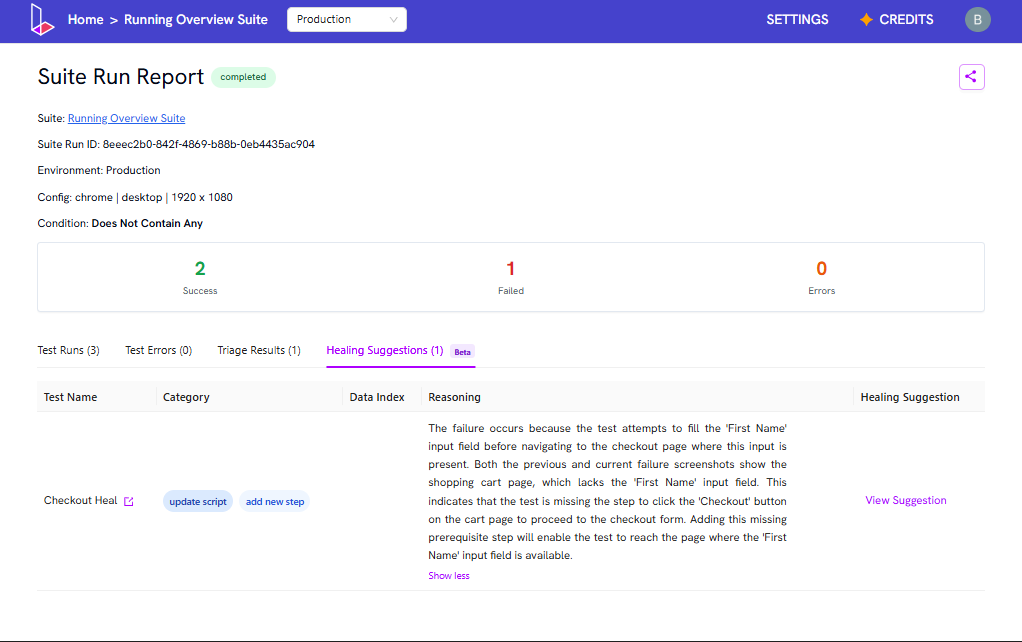
After every run, if a test fails, the report will include a section called **Healing Suggestions**. This section will suggest changes to fix the failure.
1. Review the reasoning provided for the suggested change.
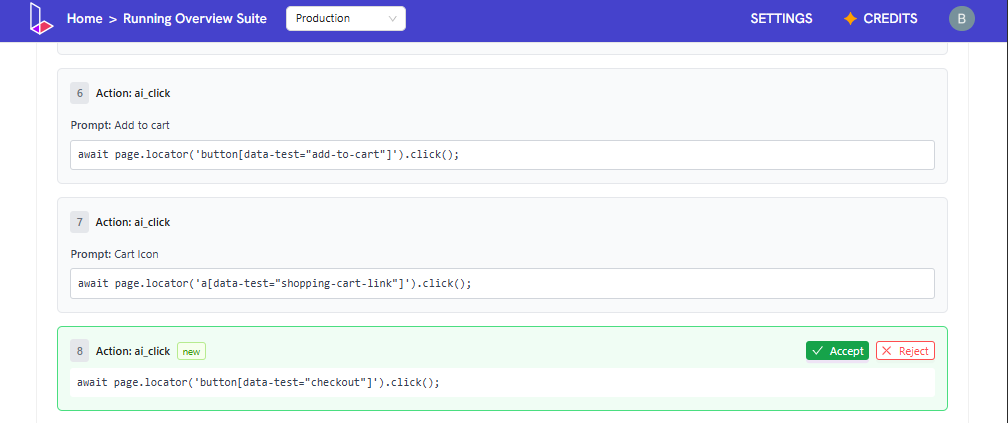
2. Click **View Suggestion** to see the proposed update.
3. If the change looks good, click **Accept**. The change will be applied directly to the test.
4. If you do not want to apply the suggestion, click **Reject** to dismiss it.